If your store ran custom discounts on Shopify Scripts, they stopped working on June 30, 2026.
Shopify retired legacy Ruby Scripts for good on that date. There is no extension, no grace period, and no way to publish new ones. If your promotions relied on Scripts for tiered pricing, BOGO, or spend thresholds, those rules are now dead until you rebuild them on Shopify Functions.
The good news: for most discount logic, you do not need to write a single line of code to migrate. This guide walks through exactly what to do.
What actually changed
Shopify Scripts were interpreted Ruby that ran on Shopify’s servers. Shopify Functions are the replacement, built in JavaScript or Rust and compiled to WebAssembly, which makes them dramatically faster and native to checkout.
Here’s the part that matters for you: Scripts and Functions are not the same code. You cannot copy your old Ruby into a Function. You have to rebuild the logic, either through an app that already runs on Functions, or by writing a custom Function yourself.
Step 1: Figure out which Function replaces your Script
Every old Script maps to a specific type of Shopify Function based on what it did:
- Line-item discounts (BOGO, tiered pricing, percent off specific products) map to the Product Discount function.
- Cart-level discounts (spend $100, get $10 off the order) map to the Order Discount function.
- Shipping discounts (free or discounted rates by condition) map to the Delivery Customization function.
- Payment rules (hide a gateway by country or cart total) map to the Payment Customization function.
Most merchants only used Scripts for the first two. If that’s you, the rest of this guide is straightforward.
Step 2: Choose your migration path
You have two options. Pick based on whether your discount logic is standard or genuinely custom.
Path A: Use an app built on Functions (recommended for most stores)
If your discounts follow normal promotional patterns, volume breaks, BOGO, free gifts, customer-tag pricing, spend thresholds, you do not need a developer. An app built on Shopify Functions recreates that logic with no code.
This is where a logic-driven discount app matters. Regios Discounts, for example, is built entirely on Shopify Functions and uses a flowchart-based logic builder, so you rebuild even complex Script rules by chaining conditions in an “if this, then that” format. We shipped that flowchart builder years before most competitors, specifically so merchants could express advanced discount logic without touching Ruby or WebAssembly.
A few things that make the app path safer than a rushed custom build:
- You can rebuild conditional logic (tags, quantities, cart contents, customer segments) visually instead of in code.
- A testing page lets you simulate carts and confirm discounts apply correctly before you go live, which matters a lot when your old Scripts are already offline.
- Because it runs on Functions, it works across the online store and POS without the compatibility issues older draft-order apps caused.
Path B: Build a custom Function (for genuinely bespoke logic)
If your Scripts called external APIs, used proprietary business rules, or triggered on unusual metafields, you may need a developer to build a custom Function. The rough process:
- Install the latest Shopify CLI.
- Run
shopify app generate extensionand choose the Product Discount or Order Discount target. - Edit the input query to pull only the cart data you need.
- Write your logic in JavaScript or Rust.
- Deploy with
shopify app deployand attach it to an automatic discount.
This is the flexible path, but it is real engineering work. Do not start here unless Path A genuinely can’t express your rules.
Watch out: your discount totals may change after migrating
This is the part that catches merchants off guard, and it’s the most important thing to check.
Once your discounts run on Functions, Shopify’s native combination rules apply. If you relied on how Scripts sequenced discounts, your totals can come out different even when the logic looks identical.
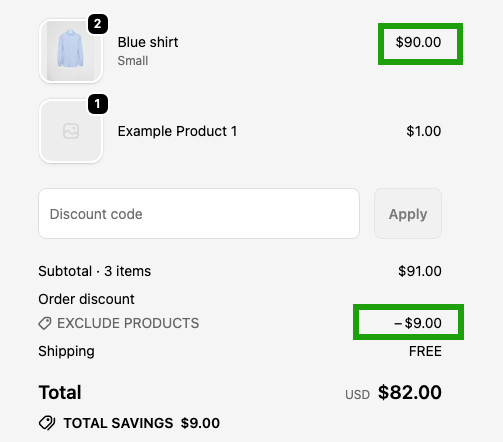
The common surprise: under Scripts, a discount code often applied to the order total after your tier discount reduced it. On Functions, two order-level percent discounts both calculate from the original subtotal, not sequentially. So a code that used to come off the reduced price now comes off the full price, and the customer pays a different amount.
The fix: product discounts apply before order discounts, so convert one of the two from an order discount to a product discount. The remaining order discount then calculates off the already-reduced subtotal, restoring the old sequential behavior. In a real case, recreating a merchant’s automatic 20% as a product discount (leaving their code as an order discount) matched their pre-migration totals exactly.
Not sure which type each discount should be? Our AI generator can help: describe the discount in plain English and it builds the logic for you.
There’s a second behavior change to know about: Scripts could apply multiple product discounts to the same line item on their own. Functions can’t do that directly. To stack two product discounts on one line (Shopify Plus only), you now need Discount Stacking Tags: each discount gets a tag, and its combination settings specify which other tags it can stack with. Both discounts have to opt into each other.
Before relying on any stacked setup, read our discount stacking and combinations guide so the new behavior doesn’t surprise you at checkout.
Step 3: Test before you flip it live
Your old Scripts are already off, so there is no fallback. Test carefully:
- Route the new discount to a test customer using a customer tag first.
- Run real test checkouts and confirm the totals match what your Script used to produce.
- Only then activate it for all customers.
The short version
Shopify Scripts are gone as of June 30, 2026, and discount logic now lives on Shopify Functions. For standard promotions, a Functions-based app rebuilds your rules with no code and lets you test before launch. For truly custom logic, a developer can build a custom Function. Either way, the sooner you rebuild, the sooner your promotions come back online.
If your old Scripts handled complex conditional discounts and you want them working again without writing code, that’s exactly what we built Regios for.
The best Shopify discount Functions app for migration
If you are replacing Script-based discount logic, the best Functions-based app is one focused specifically on discounts, not a general-purpose Functions builder. Regios Discounts is that option: it is built entirely on Shopify Functions and carries the Built for Shopify badge. It uses a flowchart logic builder to recreate the “if this, then that” structure your old Scripts had, and a plain-English AI generator to build discounts from a description. Together, those let you rebuild Script logic without writing code.